Sidify Amazon Music Converter


How to Download Amazon Music Dolby Atmos and Save EAC3 Audio Offline?
Learn how to download Amazon Music Dolby Atmos tracks for offline playback and explore options to save and convert tracks for permanent listening beyond app limitations.

Amazon Music Dolby Atmos is a feature of Amazon Music that delivers Dolby Atmos and Spatial Audio for a more immersive listening experience. However, these high-quality audio formats are designed primarily for streaming and cannot be downloaded as standard audio files. Even when you download music in HD or Ultra HD, Dolby Atmos tracks remain encrypted cache files playable only within the Amazon Music app.
This guide will show you how Amazon Music Dolby Atmos works, why it cannot be downloaded directly, and how to download and save it for offline audio files.
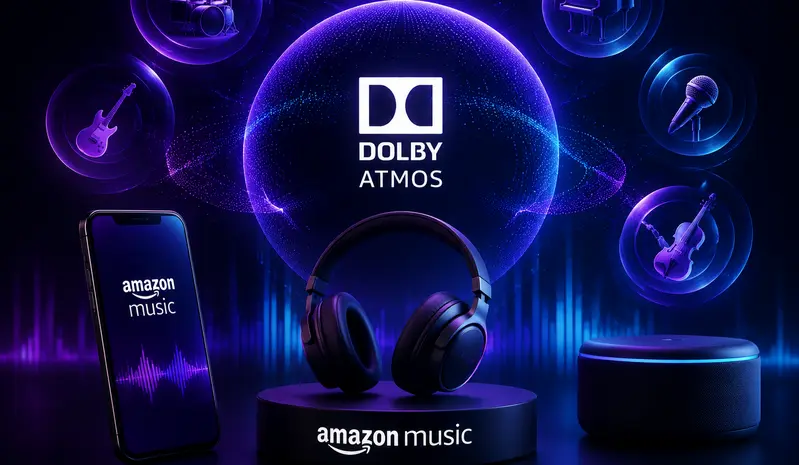
Does Amazon Music Support Dolby Atmos?
Yes. Amazon Music supports Dolby Atmos for Amazon Music Unlimited subscribers on compatible devices, allowing users to stream selected tracks with immersive spatial audio. This feature has been available since 2019 and continues to expand across supported content and devices.
Can You Download Dolby Atmos Music from Amazon Music?
No. Dolby Atmos Music can only be downloaded and played offline within the Amazon Music app. If you subscribe to Amazon Music Unlimited, you can download Dolby Atmos tracks.
However, although offline downloads are supported, the track cannot be exported. All downloaded Amazon Music Dolby Atmos tracks can only be played inside the Amazon Music app and cannot be saved or exported as standalone audio files (such as MP3 or original spatial audio files) to other devices or third-party players. In addition, once the subscription expires, these downloaded files will no longer be accessible.
How to Download Amazon Music Dolby Atmos as EAC3?
When using Amazon Music Dolby Atmos, all downloaded tracks depend on your Amazon Music Unlimited subscription. Once the subscription expires, even songs cached locally can no longer be played. This means you do not truly own the audio files, and access to Amazon Music Dolby Atmos offline content is limited to the active subscription period.
If you want to enjoy Dolby Atmos Spatial Audio without restrictions, you won’t want to miss the next section, where we introduce a method to save Amazon Music Dolby Atmos as EAC3 using Sidify Amazon Music Converter, allowing you to keep immersive audio permanently without relying on the Amazon Music app or subscription status.
Sidify Amazon Music Converter is a professional Amazon Music to EAC3 converter. It preserves original sound quality when converting Amazon Music Dolby Atmos tracks, while also keeping ID3 tags. It supports multiple formats: EAC3, AC4, MP3, AAC, WAV, FLAC, AIFF, and ALAC. Next, we will show you the specific steps.
Sidify Amazon Music Converter
- Supports Dolby Atmos and Spatial Audio sound quality.
- Convert Amazon Music to MP3, AAC, WAV, FLAC, AIFF, ALAC, EAC3, AC4.
- Keep original HD / Ultra HD audio quality.
- Preserve complete ID3 tags and export lyrics.
- Batch download Amazon Music at 10× faster speed.
-
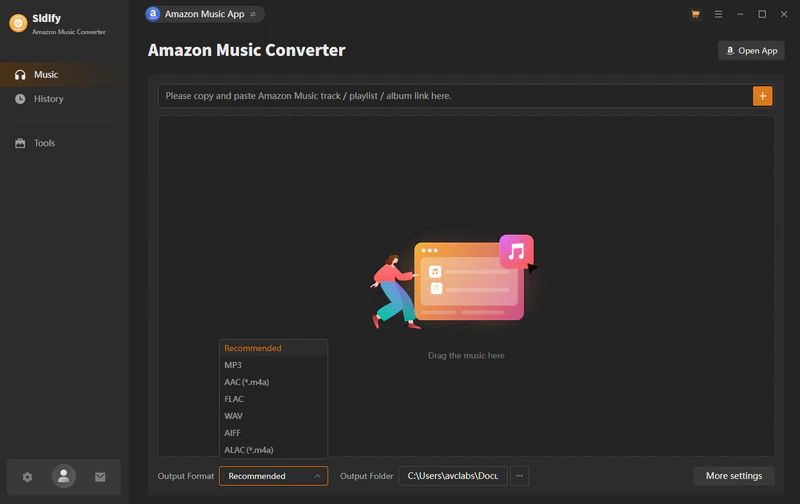
Step 1Launch Sidify Amazon Music Converter
Install and open Sidify Amazon Music Converter on your computer. Then log in with your Amazon Music Unlimited account.
-
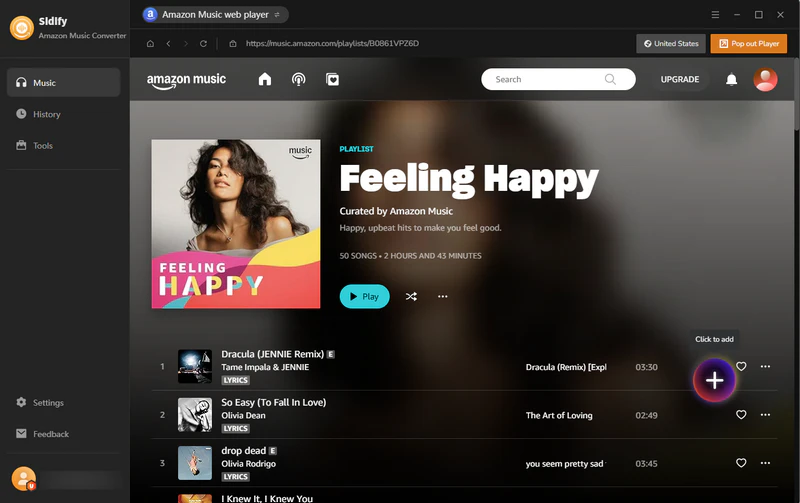
Step 2Add Songs, Albums, or Playlists to Sidify
Open the songs, albums, or playlists you want to download, then click the “+” button to add them to Sidify.
-
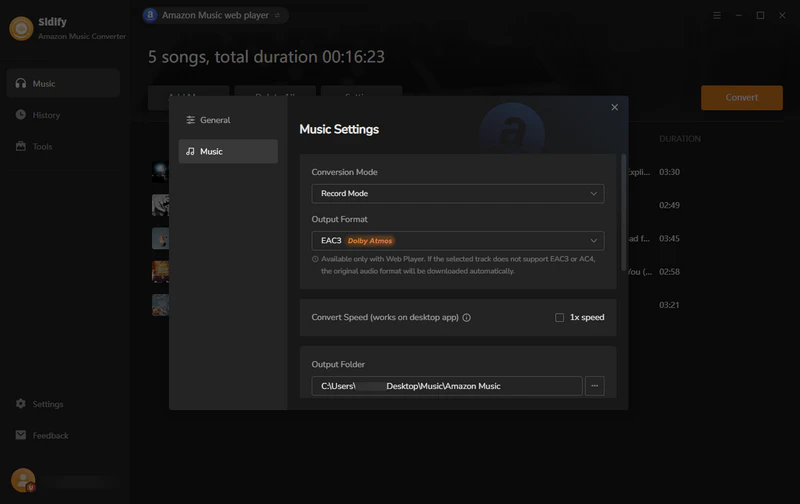
Step 3Choose EAC3 as Output Format
Go to the Settings and select EAC3 as the output format.
-
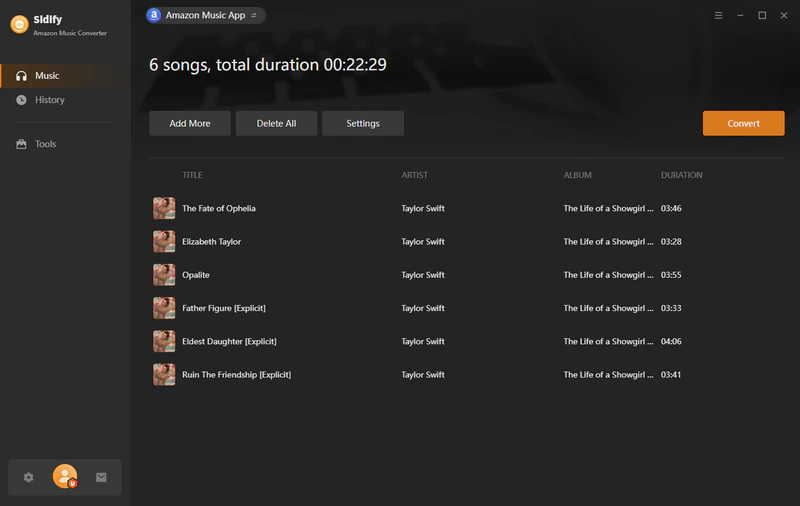
Step 4Start Conversion
Click the “Convert” button to begin downloading Amazon Music tracks into local EAC3 files.
-
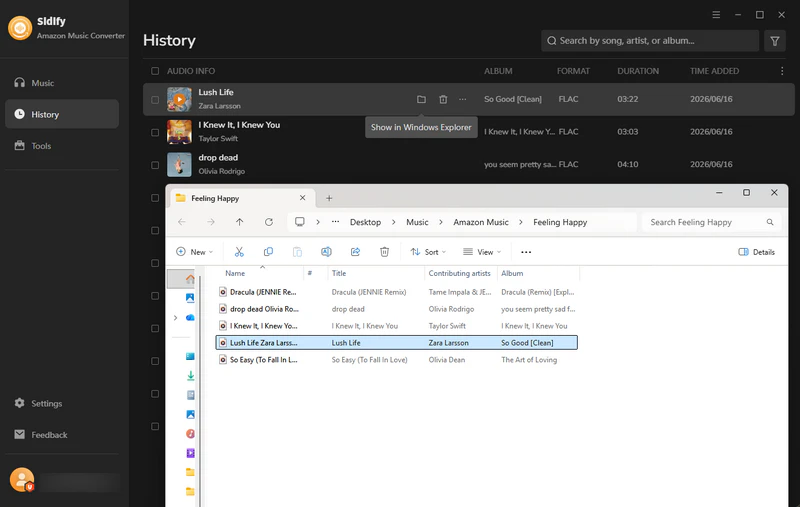
Step 5Check Converted Files
Once the conversion is finished, go to the History tab to find and access your downloaded EAC3 Amazon Music files.
Devices That Support Amazon Music Dolby Atmos
Amazon Music Dolby Atmos is supported on a wide range of devices, including smart speakers, streaming devices, TVs, mobile devices, and headphones.
| Device Type | Supported Devices |
|---|---|
| Smart Speakers & Audio Systems |
Echo Studio Echo Show 10 Sonos (Arc, Beam, Era 300) Sony SRS-RA3000 / RA5000 |
| Streaming Devices & Fire TV |
Fire TV Cube Fire TV Stick 4K Fire TV Stick 4K Max Google Chromecast |
| Smart TVs |
Sony BRAVIA TVs Samsung Smart TVs LG Smart TVs |
| Mobile Devices |
iPhone & iPad Android phones & tablets |
| Headphones |
Sony WH-1000XM series Bose QuietComfort series Dolby Atmos-compatible headphones |
Amazon Music Dolby Atmos vs Ultra HD: What’s the Difference?
| Feature | Amazon Music Dolby Atmos | Amazon Music Ultra HD |
|---|---|---|
| Audio Experience | Spatial audio with 3D sound effects | High-resolution audio |
| Audio Format | Dolby Digital Plus (E-AC-3 JOC) | FLAC-based lossless streaming audio |
| Bit Depth / Sample Rate | Up to 24-bit / 48 kHz(varies by device) | Up to 24-bit / 192 kHz |
| Device Compatibility | Limited to Atmos-supported devices | Widely supported across devices |
| Best For | Immersive, theater-like listening experience | Audiophile-grade sound quality |
Conclusion
Amazon Music Dolby Atmos delivers an immersive Spatial Audio experience, but it is limited to Amazon Music Unlimited and supported devices, and playback is restricted to the app. For greater flexibility, tools like Sidify Amazon Music Converter let users save tracks in common formats for offline listening across devices.
FAQ about Amazon Music Dolby Atmos
How do I enable Dolby Atmos in Amazon Music?
To enable Dolby Atmos in Amazon Music, you need an Amazon Music Unlimited subscription and a compatible device. Open the Amazon Music app, go to Settings, and make sure Spatial Audio / Dolby Atmos playback is enabled.
Can I download Amazon Music Dolby Atmos tracks?
You can download Dolby Atmos tracks in the Amazon Music mobile app for offline listening, but they cannot be exported as standard audio files. If you want to permanently save Amazon Music Dolby Atmos tracks, you can use Sidify Amazon Music Converter.
Is Amazon Music Dolby Atmos available on Windows or Mac?
No, Amazon Music Dolby Atmos is not currently available on Windows or Mac desktop apps. Dolby Atmos playback is mainly supported on compatible mobile devices, smart speakers, TVs, and streaming devices through the Amazon Music app. On computers, the Amazon Music desktop app does not support Dolby Atmos or Spatial Audio playback.
How do I know if a song is Dolby Atmos on Amazon Music?
You can easily identify Amazon Music Dolby Atmos tracks by looking for the “Dolby Atmos” or “ATMOS” badge displayed next to the song or album in the Amazon Music app. These labels indicate that the track supports Spatial Audio playback. You can also check the song details page, where Amazon Music indicates whether the track is available in Dolby Atmos.
Is there a way to get Dolby Atmos for free?
Amazon Music Dolby Atmos is available only with an Amazon Music Unlimited subscription. However, Amazon sometimes offers a free trial of Amazon Music Unlimited, during which you can stream Dolby Atmos tracks for a limited time.Alternatively, you can use Sidify Amazon Music Converter to download Amazon Music tracks for offline use and keep them permanently.
What is Amazon Music Dolby Atmos?
Amazon Music Dolby Atmos is an immersive audio technology that creates a 3D listening experience by placing sounds around and above you. Unlike traditional stereo audio, Dolby Atmos uses advanced spatial audio technology to add more depth, clarity, and detail to compatible songs. With supported devices, listeners can enjoy music with a more realistic and immersive sound experience.
Sidify Amazon Music Converter
Save Amazon Music Dolby Atmos and HD/Ultra HD audio with ID3 tags at 10X speed.

Sidify Amazon Music Converter
Convert Amazon Music to MP3, AAC, WAV, FLAC, AIFF, ALAC, EAC3, or AC4 formats with original high quality kept.