Sidify Amazon Music Converter


Sidify Amazon Music Converter Review: Is It Worth Trying in 2026?
Covering features, audio quality, speed, pros & cons, and pricing.

Are you still frustrated that Amazon Music does not allow you to download HD or Ultra HD audio directly as local files? While Amazon Music offers a high-quality listening experience, it does not support saving songs as standard audio files, meaning you need third-party tools to better manage your music collection.
With so many Amazon Music converters available, does Sidify Amazon Music Converter deliver the high-quality downloads and flexible playback options you are looking for? In this review, we will take an in-depth look at its key features, audio quality, conversion speed, pros & cons, pricing, and overall user experience.
Quick Verdict
| Rating | ⭐ 4.8/5 |
|---|---|
| Best for | Amazon Music users who want to download songs, playlists, and albums for offline playback |
| Compatibility | Windows 7 or later (32/64-bit), macOS 11 and above |
| Pros | Ultra HD audio preservation, Dolby Atmos & Spatial Audio support, fast batch conversion, metadata retention |
| Cons | The trial version only converts the first 1 minute of each song |
| Verdict | Sidify Amazon Music Converter is a worthwhile option for high-quality audio conversion and flexible playback in 2026 |
What is Sidify Amazon Music Converter
Sidify Amazon Music Converter is a professional desktop tool designed to convert Amazon Music songs, playlists, and albums into MP3, AAC, WAV, FLAC, AIFF, ALAC, EAC3, and AC4 while preserving full metadata, including song details and album artwork. It supports Amazon Music Free, Prime, and Unlimited users. For those who prioritize high audio fidelity, Sidify can preserve available Amazon Music HD and Ultra HD audio quality, as well as Dolby Atmos and Spatial Audio when supported by the source audio. It is suitable for users who need offline playback, music backup, and flexible playback across different devices.
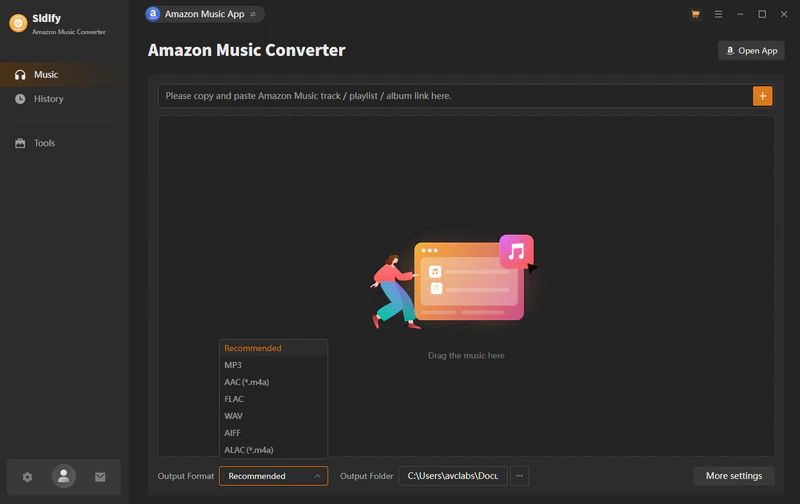
Key Features of Sidify Amazon Music Converter
Convert Amazon Music to Multiple Formats
Sidify supports converting Amazon Music songs, albums, and playlists into MP3, AAC, WAV, FLAC, AIFF, ALAC, EAC3, and AC4 files on your local computer. You can transfer your converted Amazon Music files to various devices, including USB drives, MP3 players, and DJ software, for more flexible offline playback.
Preserve Ultra HD Audio Quality & Support Dolby Atmos
Sidify promises to keep the original sound quality of the songs. This means you can preserve Amazon Music HD and Ultra HD audio quality during conversion. It also supports Dolby Atmos and Spatial Audio when available in the source, for a high-quality, immersive listening experience.
10x Faster Batch Download
The tool offers a batch conversion feature that allows you to add hundreds of Amazon Music tracks at once. With up to 10x faster conversion speed, it helps save time when converting large music collections.
Keep Full ID3 Tags and Lyrics
Keep essential metadata such as song titles, artists, album artwork, and lyrics intact after conversion for better music organization and playback.
Built-in Tools
Includes built-in tools for AA/AAX conversion, local audio conversion, tag editing, audio editing, and CD burning, offering a more complete music management experience.
Sidify Amazon Music Converter Review: Hands-on Test
To comprehensively evaluate the real-world performance of Sidify Amazon Music Converter, we tested aspects such as its installation process, user experience, conversion speed, audio quality, and metadata retention. Overall, the tool offers a streamlined workflow and a stable conversion process.
How to Use Sidify Amazon Music Converter
Sidify Amazon Music Converter features a clean and intuitive interface. Even new users who have never used similar tools can quickly complete the entire conversion process.
-
Step 1Install Sidify and log in to Amazon Music
Install and launch Sidify Amazon Music Converter on your computer. Sidify offers two conversion modes: Amazon Music app mode and Amazon web player mode. Here, we select the web player mode to access and log in to your Amazon Music Account.

-
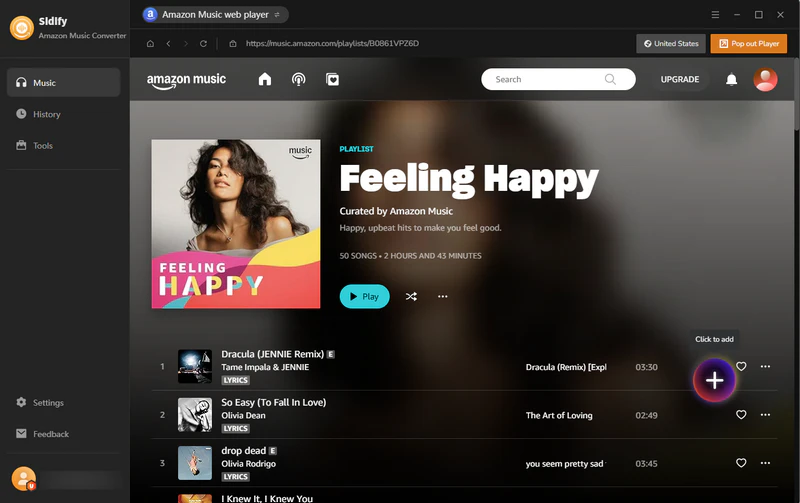
Step 2Add Amazon Music to Sidify
Search for the song, album, or playlist you want to convert and click the "+" button to add them to Sidify.
-
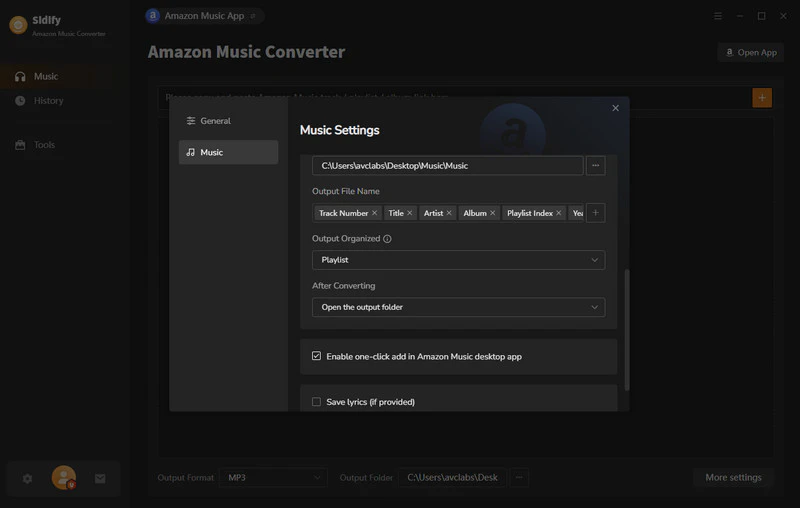
Step 3Configure output parameters
Go to the settings page, where you can select the output format, including MP3, AAC, WAV, FLAC, AIFF, ALAC, EAC3, and AC4, and adjust settings such as output quality and output path.
-
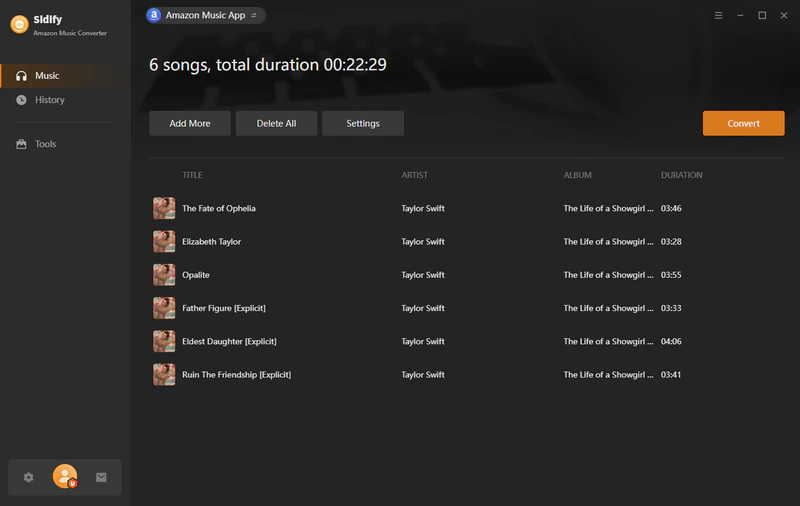
Step 4Start Converting Amazon Music
Once you have finished the settings, click the Convert button, and Sidify will download and save the selected music to your local computer.
-
Step 5View and play the converted files.
Once the conversion is complete, go to the history section and click the file icon to view the downloaded files on your computer.
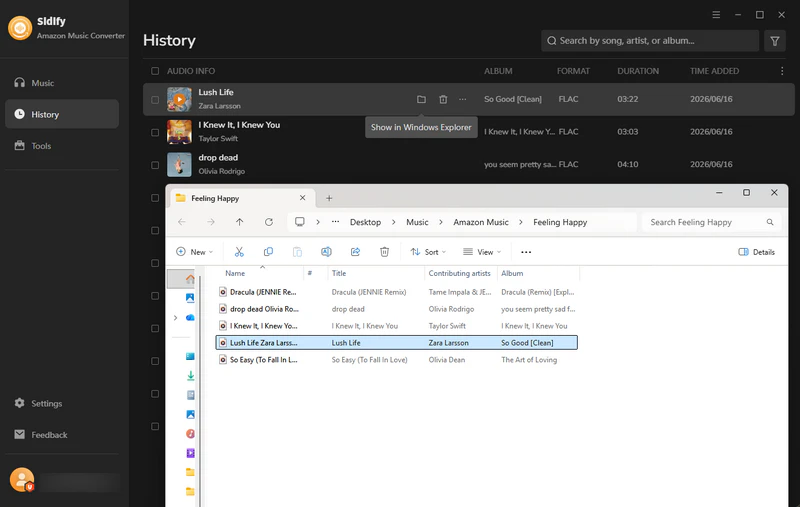
We selected 5 Amazon Music songs for conversion; the entire process took only about 1 minute, demonstrating stable conversion speeds.
The converted files retain full metadata, including song titles, artists, album names, track numbers, and album artwork. The converted audio also maintains excellent sound quality. For Amazon Music Ultra HD audio, the overall test results are outstanding.
Sidify Amazon Music Converter Pros & Cons
After practical testing and hands-on use, Sidify Amazon Music Converter performs well in terms of audio quality retention, format support, and ease of use, though it does have some limitations. Here are its main pros and cons:
-
 Supports Amazon Music Free, Prime, and Unlimited
-
Multiple output formats.
-
Preserve HD & Ultra HD audio quality.
-
Dolby Atmos & Spatial Audio support.
-
Batch conversion at 10× speed.
-
Preserve full metadata & lyrics.
-
 Trial version limitation.
-
Desktop-only conversion.
Sidify Amazon Music Converter Pricing
Sidify Amazon Music Converter offers a free trial and a Pro version. The free trial allows you to convert the first minute of each song to try out the software, while the paid version offers annual and lifetime license plans:
1-Year Plan
Lite
Billed annually at US$44.95/year
- Full features
- Unlimited downloads
- 1-Year Free Updates & Technical Support
- 5-Day Money Back Guarantee

Lifetime Plan
Core
- Full features
- Unlimited downloads
- Lifetime Free Updates & Technical Support
- 30-Day Money Back Guarantee

Sidify Amazon Music Converter vs Alternatives
There are various Amazon Music converters available on the market, such as TunePat Amazon Music Converter and ViWizard Amazon Music Converter. To help you make the best choice, we compare them based on factors including supported formats, audio quality, conversion speed, metadata, and special features.
| Feature | Sidify Amazon Music Converter | Alternatives |
|---|---|---|
| Supported Platforms | Amazon App & Web player | Web player |
| Output format | MP3, AAC, WAV, FLAC, AIFF, ALAC, EAC3, AC4 | MP3, WAV, M4A, AIFF, FLAC |
| Sound quality | Ultra HD | Ultra HD |
| Dolby Atmos / Spatial Audio | ✅ | ❌ |
| Metadata preserved | Completely | Some labels are missing |
| Batch conversion | ✅ | ✅ |
| Conversion speed | 10× | 10× |
| Extra Tools | AA/AAX Converter, Tag Editor, Format Converter, Audio Editor, Burn CD | ❌ |
FAQs About Sidify Amazon Music Converter
Is Sidify Amazon Music Converter Legal to Use?
Sidify is designed for personal use. However, users should always comply with applicable copyright laws and Amazon Music’s terms of service. It is recommended to use the software responsibly and only convert content you have the right to access.
Is Sidify Amazon Music Converter Safe to Use?
Yes, Sidify Amazon Music Converter is generally safe to use. The program interface is clean and ad-free, providing a straightforward conversion experience without unwanted interruptions. Users should always download the software from the official website to ensure security and stability.
Can I Use Sidify After Canceling My Amazon Music Subscription?
Yes. Music files converted with Sidify are saved locally on your computer and can be played with compatible media players even after canceling your Amazon Music subscription.
Final Verdict
Based on my hands-on testing, Sidify Amazon Music Converter performed well in terms of conversion speed, audio quality, and metadata retention. It supports various output formats and offers features such as original audio quality preservation and batch conversion. Overall, Sidify Amazon Music Converter is worth considering for users who want better control over their Amazon Music libraries.
Sidify Amazon Music Converter
Convert Amazon Music to MP3 and other popular formats with original audio quality and preserved ID3 tags.

Sidify Amazon Music Converter
Convert Amazon Music to MP3, AAC, WAV, FLAC, AIFF, ALAC, EAC3, or AC4 formats with original high quality kept.