Sidify Amazon Music Converter


How to listen to Dolby Atmos music on Amazon Music?
Learn how to enjoy Dolby Atmos music on Amazon Music, find compatible tracks, and listen offline with the right tools for a better immersive audio experience.

Want to enjoy Dolby Atmos music on Amazon Music but don’t know where to find or play it? Many users subscribe to Amazon Music Unlimited yet still can’t tell which songs support Dolby Atmos or why they lose access when their subscription expires.
In this guide, we’ll show you how to listen to Dolby Atmos music on Amazon Music, including how to find Dolby Atmos songs, start playback, check device compatibility, and enjoy offline listening even after your subscription ends.
Does Amazon Music Support Dolby Atmos?
Yes, Amazon Music supports Dolby Atmos Music, delivering a more immersive, spatial audio experience. However, to access Dolby Atmos Music on Amazon Music, you need an active Amazon Music Unlimited subscription and a compatible device. Only songs labeled with the Dolby Atmos badge support this immersive audio format.
What Devices Support Dolby Atmos on Amazon Music?
Amazon Music Dolby Atmos can be enjoyed on a variety of compatible devices, including smart speakers, streaming devices, smart TVs, mobile devices, and headphones. Supported devices include Amazon Echo Studio, Fire TV devices, Sonos soundbars, Sony BRAVIA TVs, Samsung Smart TVs, iPhone and iPad models, Android devices, and Dolby Atmos-compatible headphones.
You can also experience Dolby Atmos Music through compatible soundbars, speakers, AV receivers, and home theater systems. With the right setup, Amazon Music can deliver a more immersive listening experience with greater depth, clarity, and spatial detail.
For users who want to enjoy Amazon Music Dolby Atmos on more devices or listen offline, downloading Amazon Music tracks with a compatible music converter can provide greater playback flexibility.
How to Find and Play Dolby Atmos Music on Amazon Music?
To enjoy Dolby Atmos music on Amazon Music, you need an Amazon Music Unlimited subscription, a compatible device, and the correct playback settings. Follow these steps to start listening.
1. Get Amazon Music Unlimited
Dolby Atmos music is available only to Amazon Music Unlimited subscribers. If you are on a free or Prime Music account, upgrade to Amazon Music Unlimited first. You can start your free trial in your Amazon Music Settings to unlock access to Dolby Atmos albums, playlists, and songs.
2. Enable Dolby Atmos Playback
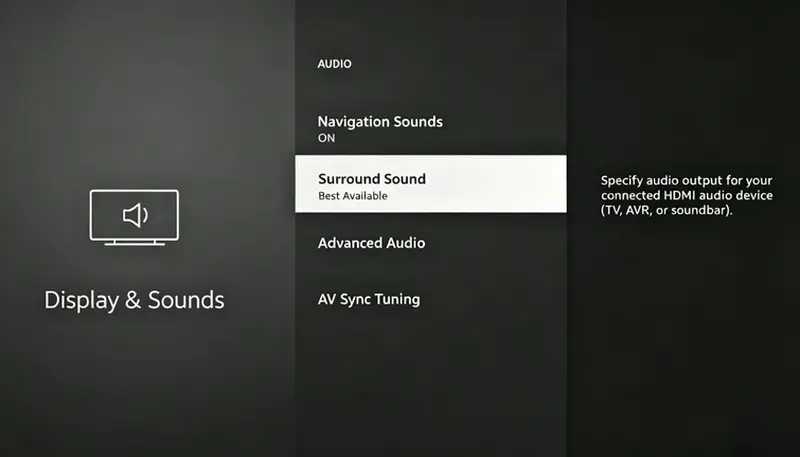
Before playing Dolby Atmos tracks, make sure Dolby Atmos is enabled in your Amazon Music settings.
On Mobile Devices:
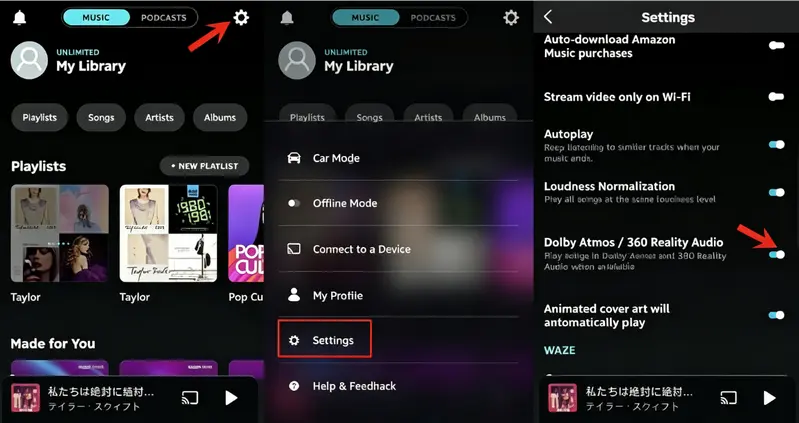
On Fire TV:
3. Find and Play Dolby Atmos Music on Amazon Music
Once Dolby Atmos is enabled, you can easily find compatible music on Amazon Music.
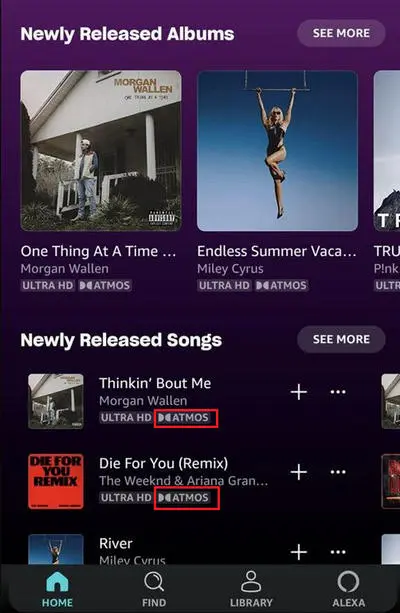
When playback starts, the Dolby Atmos badge will appear on the Now Playing screen, confirming that immersive audio is enabled.
How to Download Amazon Music Dolby Atmos Music for Offline Listening?
Can You Download Dolby Atmos Songs Directly from Amazon Music?
No, Amazon Music does not support downloading music in other formats. Only Amazon Music Unlimited subscribers can download songs, albums, and playlists for offline listening in the Amazon Music app. However, these downloads are stored in the app and can be accessed and played only while your subscription remains active.
Once your Amazon Music Unlimited subscription expires, you will no longer be able to listen to downloaded Dolby Atmos music, even if it is still saved in the app.
If you want to avoid these limitations and keep your favorite Amazon Music tracks available for offline playback at any time, there is another solution. The next section will introduce a way to save Amazon Music songs more flexibly for offline listening.
Best Way to Save Amazon Music Dolby Atmos Music Offline
If you prefer to download Dolby Atmos music to your local drive, you can rely on professional software. Sidify Amazon Music Converter is a professional tool for downloading Amazon Music tracks for offline listening, supporting various output formats, including EAC3, AC4, MP3, AAC, WAV, FLAC, AIFF, and ALAC. It preserves the original sound quality while keeping ID3 tags, including song titles, artists, and album information. It also supports batch download, you can convert multiple Amazon Music tracks or playlists at once, saving time and making offline playback more convenient. Next, we will show you the detailed steps.
Sidify Amazon Music Converter
- Supports Dolby Atmos and Spatial Audio sound quality.
- Convert Amazon Music to MP3, AAC, WAV, FLAC, AIFF, ALAC, EAC3, AC4.
- Keep original HD / Ultra HD audio quality.
- Preserve complete ID3 tags and export lyrics.
- Batch download Amazon Music at 10× faster speed.
-
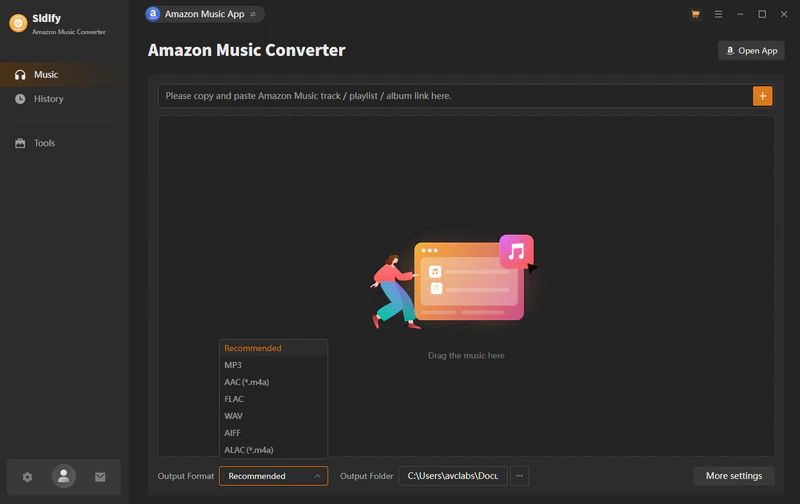
Step 1Launch Sidify Amazon Music Converter
Install and open Sidify Amazon Music Converter on your computer. Log in to your Amazon Music account.
-
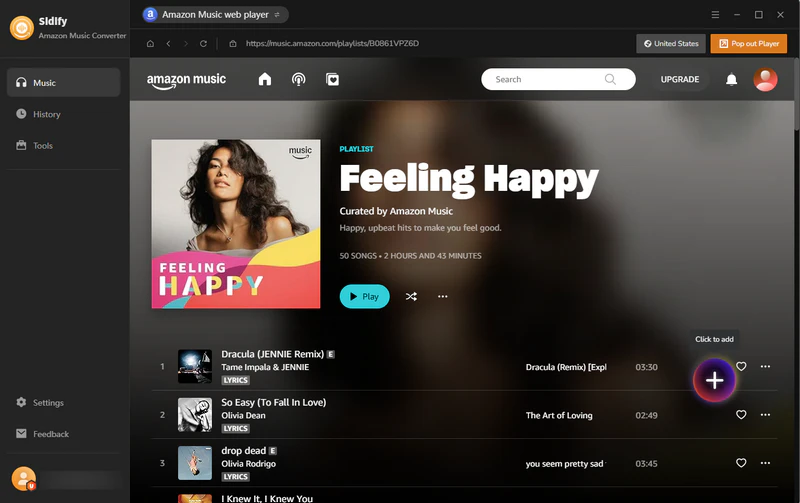
Step 2Add Songs, Albums, or Playlists to Sidify
Browse or search for the songs, albums, or playlists you want to save. Click the “+” button to add them to the conversion list. You can add multiple tracks at once with the batch conversion feature.
-
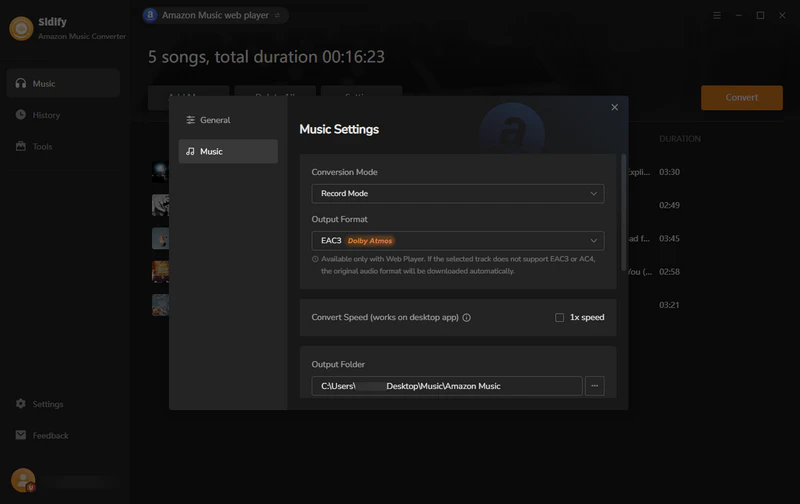
Step 3Select the Output Format
Click “Settings” and choose EAC3 as the output format. You can also set other preferences.
-
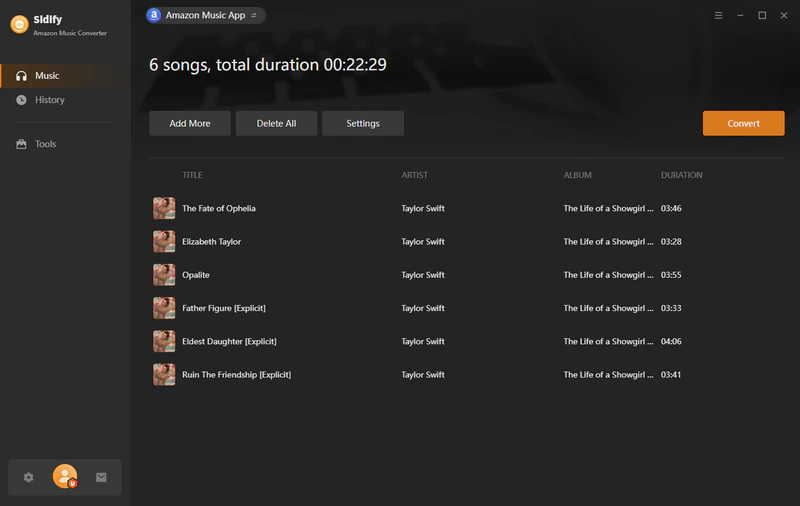
Step 4Start Conversion
Click the “Convert” button to start converting the selected Amazon Music tracks.
-
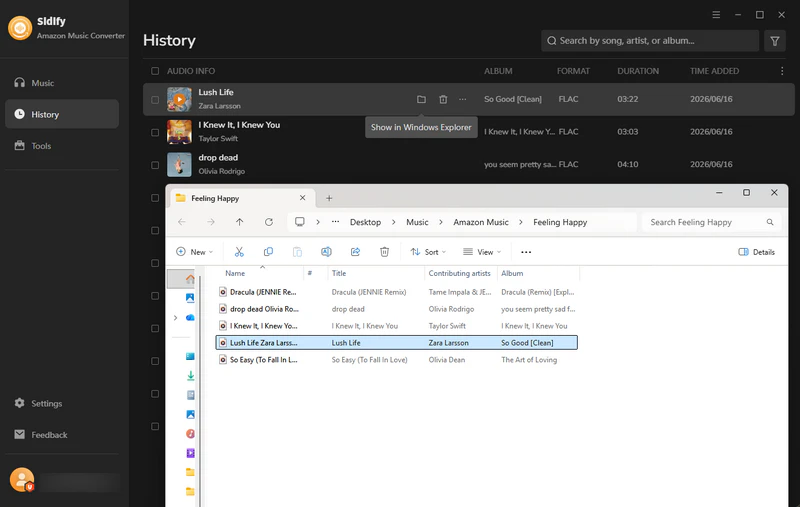
Step 5Access the Converted Files
After the conversion is complete, click the “History” tab to find your converted Amazon Music files and play them on compatible devices.
Conclusion
In this article, we explored how Dolby Atmos Music works on Amazon Music, including how to find compatible tracks, choose the right devices, and enjoy a more immersive listening experience. We also covered the limitations of Amazon Music offline downloads and introduced a way to save your favorite tracks more flexibly with Sidify Amazon Music Converter.
FAQ about Amazon Music Dolby Atmos
Does Amazon Music have Dolby Atmos?
Yes. Amazon Music supports Dolby Atmos Music, allowing listeners to enjoy a more immersive audio experience with compatible songs and devices. However, Dolby Atmos content is available only for select tracks and requires an Amazon Music Unlimited subscription.
Does Amazon Music support Dolby Atmos on all devices?
No. Dolby Atmos Music on Amazon Music only works with compatible devices and audio systems. Supported devices include select smartphones, computers, smart TVs, Echo Studio, soundbars, speakers, and home theater systems. If your device does not support Dolby Atmos, Amazon Music will play the standard audio version instead.
Can I download Amazon Music Dolby Atmos music for offline listening?
Amazon Music Unlimited subscribers can download songs for offline listening within the Amazon Music app. However, these downloads are protected and cannot be transferred as regular audio files. Once your subscription expires, you will no longer be able to access the songs you have downloaded.
Is Dolby Atmos better than regular stereo music?
Dolby Atmos provides a more immersive listening experience compared with traditional stereo audio. Instead of playing sound only from the left and right channels, Dolby Atmos creates a wider and more spatial soundstage, allowing listeners to hear more depth and detail.
Why can’t I find Dolby Atmos songs on Amazon Music?
If you cannot find Dolby Atmos songs, your account, device, or app settings may not meet the requirements. Make sure you are using an Amazon Music Unlimited subscription, the latest version of the Amazon Music app, and a compatible Dolby Atmos device. You can also search for “Dolby Atmos” or browse Dolby Atmos playlists to find supported tracks.
Sidify Amazon Music Converter
Save Amazon Music Dolby Atmos and HD/Ultra HD audio with ID3 tags at 10X speed.

Sidify Amazon Music Converter
Convert Amazon Music to MP3, AAC, WAV, FLAC, AIFF, ALAC, EAC3, or AC4 formats with original high quality kept.